Karaoke Maker: Take the Singer Out of Any Song
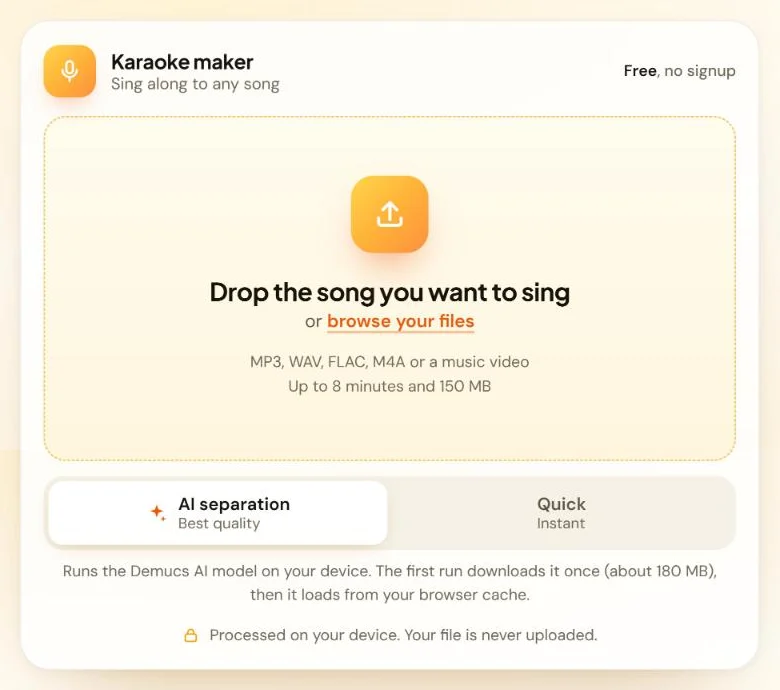
A karaoke maker takes the lead singer out of a recorded song so you can sing over the band. This free karaoke maker runs Meta’s open-source HTDemucs AI model in your browser. Add an MP3, WAV or music video and download a WAV karaoke track, with no signup, no upload and no watermark.
Blend a quiet copy of the singer back in to help you follow the melody.
Processed on your device. Your file is never uploaded.
How to make a karaoke version of a song
You can make a karaoke version of a song in four steps. You only need the song saved as a file.
1. Add your song
Drop the file onto the tool or browse for it. It accepts MP3, WAV, FLAC, M4A, OGG and Opus audio, plus MP4, MOV and WebM videos, up to 8 minutes and 150 MB.
2. Pick an engine
Choose AI separation for quality or Quick for speed. The tool selects AI separation when your browser can use your graphics card.
3. Listen and compare
Play the karaoke track next to your original song, and add some guide vocal if you need help with the tune.
4. Download the WAV
Save the karaoke track for your karaoke app, speaker or video editor.

AI karaoke maker or Quick mode: which one should you use?
Use AI separation for the cleanest karaoke track and Quick when you need a result in seconds. AI separation runs the HTDemucs model on your device and recognizes singing anywhere in the mix. Quick removes the sound in the center of a stereo recording, which is where most lead vocals sit.
If a Quick result still has too much voice, one click reruns the same song with AI separation.
| Feature | AI separation | Quick |
|---|---|---|
| How it works | The HTDemucs model predicts which sounds are voice and which are music | Removes sound in the middle of the stereo mix but keeps the bass |
| Best for | Most songs, including older and busier mixes | Modern studio songs |
| Speed | A few minutes, plus a one-time model download on your first run | Usually seconds |
| Longest song | 6 minutes | 8 minutes |
| Backing vocals | Mostly removed with the lead | Your choice: Keep, Balanced or Remove more |
| Works best with | A browser that can use your graphics card | Any modern browser |
Why does AI separation work best with a graphics card?
A graphics card runs AI math far faster than your main processor, and browsers reach it through a technology called WebGPU. Google’s web.dev team reports that WebGPU works in Chrome and Edge 113 or later on Windows, macOS and ChromeOS, in Firefox 141 or later on Windows, and in Safari 26 (source). If your browser can’t use your graphics card, the tool recommends Quick, because AI separation would run very slowly.
Learn the melody with a guide vocal
A guide vocal is a quiet copy of the original singer mixed back under your karaoke track. It helps you follow the melody and timing while you learn a song, and it works with both engines. Raise the Guide vocal slider from Off, click Apply changes, and turn it back to Off once you know the tune.
What happens to backing vocals?
AI separation takes out almost all the singing, including most harmonies and backing vocals. Quick removes only the center of the mix, so harmonies recorded wide to the left and right can stay in. With Quick, you choose how much of them to keep:
- Keep leaves wide backing vocals in for a fuller chorus.
- Balanced suits most songs.
- Remove more takes out extra vocal sound if you still hear the singer.

Your song never leaves your device
Many online karaoke makers upload your song to their servers, but this one works inside your browser tab. Your browser opens the file, runs the AI model and builds the karaoke track on your own device, so nothing is sent to us and you skip the account and the queue.
The only download is the AI model (about 180 MB), which your browser fetches the first time you use AI separation and then loads from its cache. Keep the tab open while a song is processing.
How we built and tested this karaoke maker
The team behind VocalRemover builds and maintains this tool. We chose HTDemucs because it’s open source and well documented, and Meta’s researchers report state-of-the-art results for it on the MUSDB music separation benchmark (paper).
We tested both engines in Chrome on a Windows laptop with a 20-second stereo test clip. Quick finished in under 10 seconds, and the first AI run took just over 3 minutes, including the model download. The guide vocal and backing vocal controls worked as described. Your times will depend on your device and the song’s length.
Which songs make the best karaoke tracks?
Studio recordings give the cleanest karaoke tracks. A clean, high-quality source helps too, so pick WAV or FLAC over a low-quality MP3 when you can. These are harder for any karaoke maker:
- Live recordings mix crowd noise and room sound into the vocal.
- Heavy reverb or echo can leave a faint trail of the voice.
- Mono songs put the voice and band equally in both channels, so Quick can’t split them and AI separation is the better choice.
- Songs over 6 minutes need Quick, or a trimmed file for AI separation.
Ideas for your custom karaoke tracks
Use the file anywhere you play audio:
- Sing at a party or family night through a speaker or TV.
- Rehearse for a show, an audition or a wedding.
- Record a cover over the original band, after you check the platform’s rules for covers.
- Practice a harmony part over a quiet guide vocal.
Karaoke maker or vocal remover?
This page gives you the band without the singer, plus a guide vocal for learning. If you want a pure instrumental with every voice gone, the Instrumental Maker is built for that job. All VocalRemover tools run in your browser:
- Vocal Remover splits a song into vocal and music tracks.
- Acapella Extractor keeps only the voice.
- Instrumental Maker keeps only the music.
- Background Music Remover cleans up speech in videos and podcasts.
See how the engine works for a step-by-step look inside.
Karaoke maker FAQ
Is this karaoke maker free?
Yes. The karaoke maker is free, with no signup and no watermark. It can stay free because the processing runs on your own device instead of on paid servers. You only need a modern browser and a saved copy of your song.
Is my song uploaded anywhere?
No. Your browser opens the file, runs the AI model and builds the karaoke track on your device, so your song never reaches a server. The only download is the AI model, which your browser fetches once on your first AI run and keeps in its cache.
Does it remove backing vocals too?
With AI separation, mostly yes, because the model takes out nearly all the singing it finds. With Quick, backing vocals recorded wide in the stereo mix can stay in, and the Keep, Balanced and Remove more settings control how much you hear.
Can I make karaoke from a music video?
Yes. Drop in an MP4, MOV or WebM file saved on your device, and the tool reads the audio from it and gives you a WAV karaoke track. It can’t fetch videos from YouTube or other links, so you need the video file itself.
Can I turn a Spotify or Apple Music song into karaoke?
Not with this tool, because streaming apps don’t give you a song file to open elsewhere. Use a file you own, such as a purchased MP3. Apple Music subscribers can also turn down vocals on supported songs with Apple Music Sing on iPhone 11 or later (Apple Support).
Does the karaoke track show lyrics?
No. This karaoke maker creates audio only: a WAV backing track without the lead vocal. To sing with the words on screen, play the WAV in a karaoke player or app that shows lyrics, or keep the lyrics open on a second screen.
Can I change the key of the karaoke track?
Not on this page. Download the WAV, then open it in a karaoke player or audio app that has a pitch or key change setting. Many of these apps let you move the key up or down a few steps to suit your voice.
Why is AI separation slow on my computer?
Usually because your browser can’t use your graphics card. AI separation still runs without it, but very slowly, so the tool recommends Quick instead. Updating to a browser version with WebGPU support can help, and the graphics card section above lists those versions.
Ready to sing?
Choose a song and get your karaoke track in a few minutes, right in your browser.
Last updated: November 2026